
# Advanced search
Configures the Advanced and Basic search in DMSforLegal and the document search in Epona365: where to search, the search input fields, the result columns and the search refiners (faceted search). Advanced search uses SharePoint search managed properties. Query text addendum and Hidden constraints apply to different clients and searches, see the settings below.
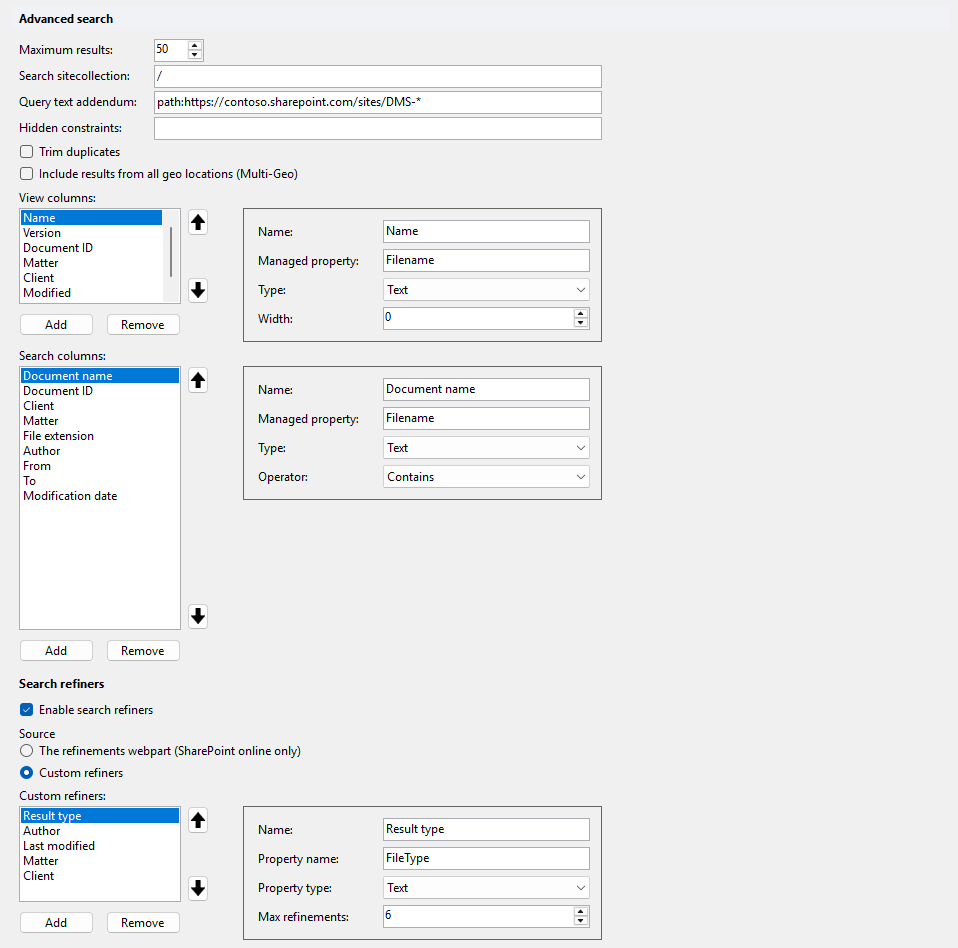
# Maximum results
Maximum number of results returned when a search query runs. Default: 50.
# Search sitecollection
Site collection to search in. Default: /. Enter a site collection URL to search in that site collection only.
When SharePoint Restricted Content Discovery is on for your DMS sites, enter the full URL, for example https://yourtenant.sharepoint.com, instead of /.
# Query text addendum
Text added to the query text (Querytext) of a search. Default: empty. Example: -ParentLink:"/sites/EponaContracts/dStyle" to exclude sites from the results.
It applies to:
- DMSforLegal: the searches that use this page.
- Epona365 Web: document searches only.
- Epona365 Office: global search and browse, Ask Epona and recent documents.
It does not apply to matter and client searches.
The addendum is combined with what the user types as (user search text) AND (addendum), and is never shown to the user. Use Hidden constraints instead for filters that must not affect Restricted Content Discovery scoping or ranking.
# Restricted Content Discovery
Restricted Content Discovery (opens new window) (RCD) hides the content of a site from organization-wide search. It is turned on per site with Set-SPOSite -Identity <site url> -RestrictContentOrgWideSearch $true and off with $false. RCD only returns content from a site when the site scope is part of the query text, so list all DMS site collections in the Query text addendum with NormSiteID, not with Path::
NormSiteID:{guid1} OR NormSiteID:{guid2}
WARNING
The addendum is combined with the user's search using AND, so it can only narrow the results. List every DMS site collection that must stay searchable, not only the sites with Restricted Content Discovery. A site that is not in the list is left out of search.
SharePoint limits the query text to about 4,000 characters, roughly 80 site IDs. When the addendum and the search text together are too long, the addendum is sent as a hidden constraint instead and a warning is logged. For that search, sites with Restricted Content Discovery are left out of the results again, so results can be missing when the search text is long.
WARNING
On older configuration lists the Value column holds only 255 characters, and saving a longer addendum fails with "Invalid text value". Run the Upgrade action for the Value field in the configuration list validation on the Configuration tab. Add all does not run it. The same applies to Hidden constraints.
# Hidden constraints
Text added to the hidden constraints (HiddenConstraints) of a search. Default: empty. It applies to the same Epona365 searches as the Query text addendum: Epona365 Web document searches, and Epona365 Office global search and browse, Ask Epona and recent documents. It does not apply to matter and client searches. DMSforLegal does not use Hidden constraints, so a value here has no effect in DMSforLegal. This is where the Query text addendum was applied in earlier versions. Use it for filters that must not affect Restricted Content Discovery scoping or ranking. Existing Query text addenda are not copied to this setting automatically. Long values need the Upgrade action for the Value field, see the warning under Restricted Content Discovery.
# Trim duplicates
Filters duplicate search results. Default: off.
# Include results from all geo locations (Multi-Geo)
Includes search results from all geo locations of a Multi-Geo tenant. Default: off.
# View columns
Result columns visible in Advanced or Basic search. Use the arrow buttons to change the column order. On SharePoint Online, Add all adds Name, Version, Document ID, Matter, Client, Modified and Modified By.
| Property | Description |
|---|---|
| Name | Column header. |
| Managed property | SharePoint search managed property shown in the column. |
| Type | Field type. |
| Width | Column width. 0 uses the available width. |
The Type changes how a result value is shown, within the limits of what DMSforLegal can show differently. For example, if a managed property returns 0 and 1, type Boolean shows them as False and True instead of integers.
When a view column stays empty in Outlook, the managed property may have a problem in SharePoint. Or the user changed the Outlook view to include a field, for example From, that is not configured here. To reset the Outlook view to the configured view, right-click in Outlook and choose Reset View.

# Search columns
Map SharePoint managed properties to input fields in the DMSforLegal Advanced Search dialog. Use the arrow buttons to change the field order. On SharePoint Online, Add all adds Document name, Document ID, Client, Matter, File extension, Author, From, To and Modification date.
| Property | Description |
|---|---|
| Name | Label of the input field on the form. |
| Managed property | SharePoint search managed property to search in. |
| Type | Field type: Text, Integer, DateTime, Boolean, User, Url, Choice, MultiChoice, Lookup, Taxonomy, Client or Matter. |
| Operator | Contains (default) or Equals. Not shown for Lookup, Taxonomy, Choice and MultiChoice fields. |
| Lookup list URL | URL of the lookup list. Lookup fields only. |
| Lookup column | Column of the lookup list. Lookup fields only. |
| Term store | Term store. Taxonomy fields only. Use the browse button to pick it. |
| Term set | Term set. Taxonomy fields only. Use the browse button to pick it. |
| Term anchor | Term anchor. Taxonomy fields only. Use the browse button to pick it. |
| Choices | Choices offered to the user, each with a Name and a Value. Choice and MultiChoice fields only. Example: Name Word documents, Value docx doc rtf. |
# Search refiners
Search refiners (faceted search) let users narrow the search result set. A field can only be used as a refiner if it is searchable and refinable in SharePoint search.
# Enable search refiners
Shows search refiners. Default: enabled.
# The refinements webpart (SharePoint online only)
Under Source: read the refiner configuration from the refinements webpart. Works only in SharePoint Online. This is the default source.
# Custom refiners
Under Source: configure the refiners manually in the Custom refiners list. These refiners must also be configured in SharePoint. When you select this option and the list is empty, it is filled with Result type, Author, Last modified, Matter and Client. Add all selects this option.
| Property | Description |
|---|---|
| Name | Caption of the refiner. |
| Property name | SharePoint search managed property, for example FileType. |
| Property type | Field type. Default: Text. |
| Max refinements | Maximum number of refinement values shown. Default: 5. |