
# Matter search
Configures the Search for a matter form in DMSforLegal: the search fields, the result columns, filters on the matters returned, and the number of results. Matter search results come from the Matters list.
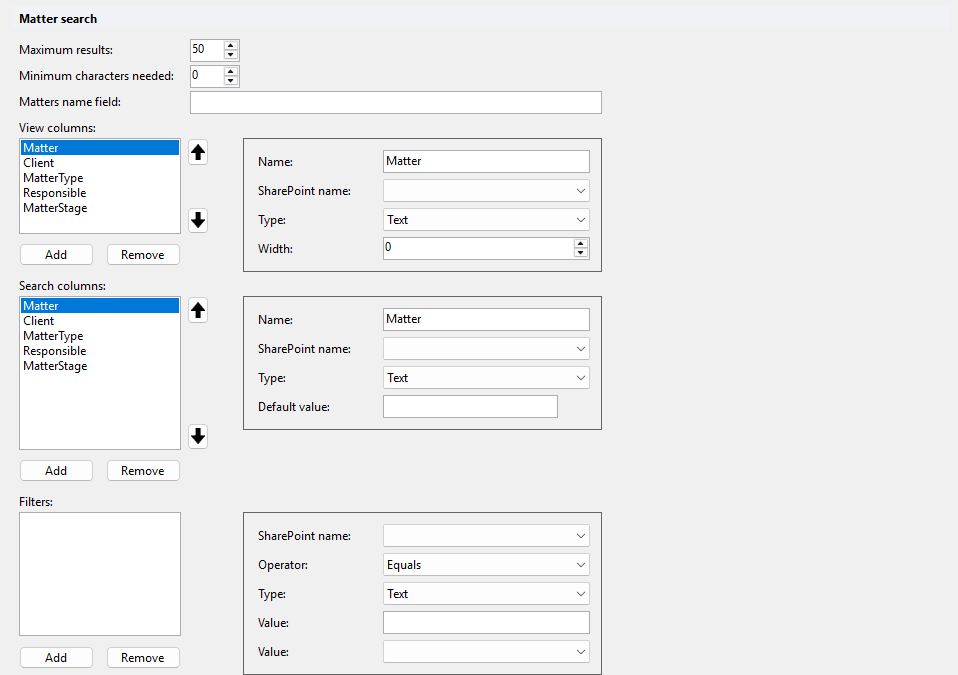
# Maximum results
Maximum number of matters returned. Default: 50.
# Minimum characters needed
Minimum number of characters needed. Default: 0.
# Matters name field
Field of the Matters list. Default: empty.
# View columns
Result columns. Use the arrow buttons to change the column order. On SharePoint Online, Add all adds Matter, Client, MatterType, Responsible and MatterStage.
| Property | Description |
|---|---|
| Name | Column header. |
| SharePoint name | Field of the Matters list. Pick it from the list. Multi-user fields are not available. |
| Type | Field type. Read-only: set automatically from the selected SharePoint field. |
| Width | Column width. |
# Search columns
Input fields of the matter search form. On SharePoint Online, Add all adds Matter, Client, MatterType, Responsible and MatterStage.
| Property | Description |
|---|---|
| Name | Label of the input field. |
| SharePoint name | Field of the Matters list to search in. Pick it from the list. |
| Type | Field type, set automatically from the selected SharePoint field. For the Client field, choose Client or Lookup. |
| Default value | Value pre-filled in the input field. For a Yes/No field, choose empty, yes or no. For a taxonomy field, use the browse button to pick a term. |
# Filters
Filters that limit the matters returned, for example only active matters. Each filter shows as <field> = '<value>' in the list.
| Property | Description |
|---|---|
| SharePoint name | Field of the Matters list to filter on. |
| Operator | Equals (default) or NotEquals. |
| Type | Field type. Read-only: set automatically from the selected SharePoint field. |
| Value | Value to compare with. Empty matches an empty field. For a Yes/No field, choose empty, yes or no. |