
# Installation and versions
DMS Configuration Center (ConfigureDMS.exe) is an administrator application to manage DMSforLegal environments. Use it to deploy, check and upgrade DMSforLegal lists, search and other configuration, such as the DMS Configuration settings.
Use DMS Configuration Center with caution. The application has extensive abilities, such as updating central search, taxonomy and content types. Use of the application is at your own risk. It is primarily used by Epona technical consultants and Epona partners.
# Version number
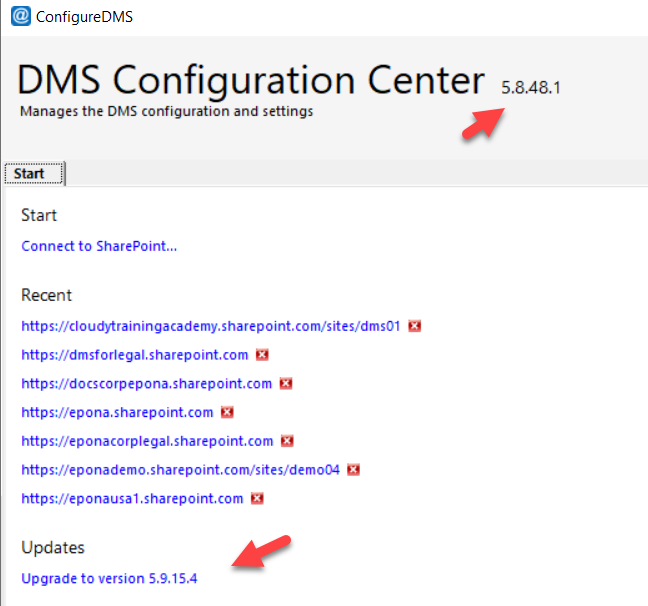
The version number shows next to the application title, in the format Major.Minor.Build.Revision (for example 5.7.47.1).
# Automatic updates
Each time DMS Configuration Center starts, it checks for a more recent version at https://dmsconfigurationcenter.blob.core.windows.net/release. If that location cannot be reached, the check fails silently and no upgrade is offered.
When a newer version is available, the link Upgrade to version x.x.x.x shows in the bottom-left corner. Click the link to upgrade:
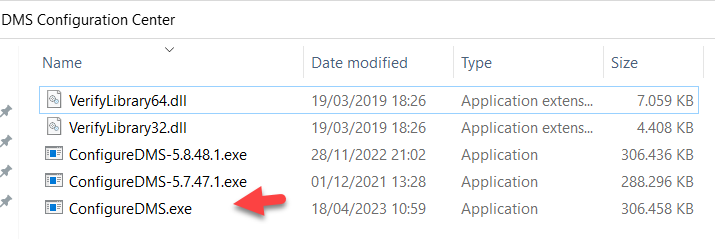
- The new files are downloaded to the folder that contains
ConfigureDMS.exe. - The current
ConfigureDMS.exeis renamed toConfigureDMS-<current version>.exe(for exampleConfigureDMS-5.7.47.1.exe) in the same folder. Other updated files are kept as<file name>.bak. - The new files replace the current ones.
- A message confirms the upgrade, and the application restarts.
Each archived version stays in the application folder. The application is around 300 MB, so every upgrade uses about 300 MB of extra disk space. Delete archived versions you no longer need.
# Roll back to a previous version
- Close DMS Configuration Center.
- Delete the current
ConfigureDMS.exe. - Rename the archived version (for example
ConfigureDMS-5.7.47.1.exe) toConfigureDMS.exe.
The next start offers the upgrade again. Do not click the upgrade link if you want to stay on the older version.