
# HighQ
HighQ portal technology is used as an extranet. Configuring HighQ allows users to upload documents from the DMS to HighQ. The integration requires a number of settings from HighQ, such as the HighQ URL, the client ID (the HighQ reference to the site) and the client secret. The version comment written to HighQ on upload can be customized.
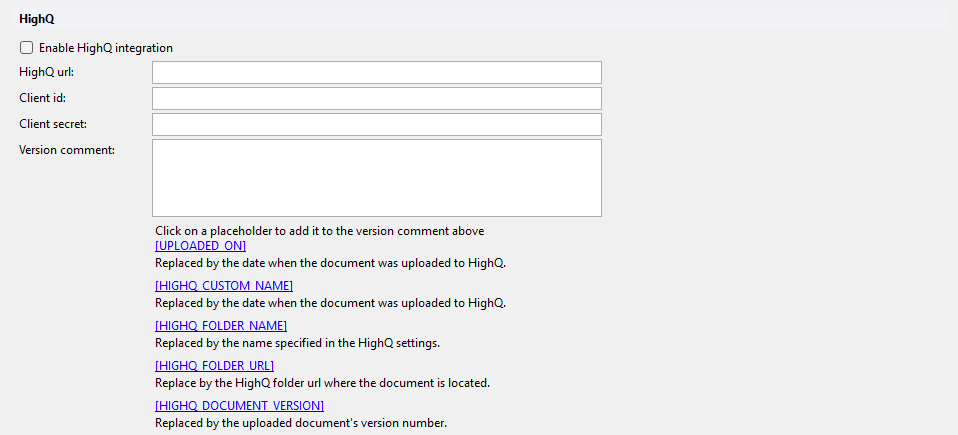
# Enable HighQ integration
Enables the HighQ integration. Default: off.
# HighQ url
URL of the HighQ instance.
# Client id
Client ID provided by HighQ (the HighQ reference to the site).
# Client secret
Client secret provided by HighQ. The value is stored encrypted.
# Version comment
Multi-line template for the version comment of a document uploaded to HighQ. Click a placeholder link below the field to append it to the template.
| Placeholder | Description |
|---|---|
[UPLOADED_ON] | Replaced by the date when the document was uploaded to HighQ. |
[HIGHQ_CUSTOM_NAME] | Replaced by the name specified in the HighQ settings. |
[HIGHQ_FOLDER_NAME] | Replaced by the name of the HighQ folder the document was uploaded to. |
[HIGHQ_FOLDER_URL] | Replaced by the HighQ folder URL where the document is located. |
[HIGHQ_DOCUMENT_VERSION] | Replaced by the uploaded document's version number. |