
# Knowledge management system (KMS)
This category holds two sets of settings:
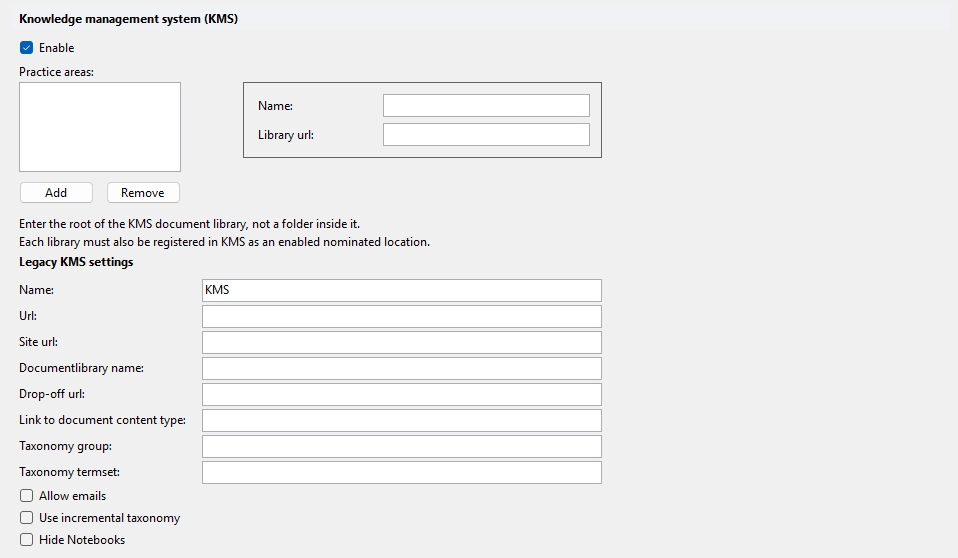
- Enable and Practice areas configure Add to KMS, the Epona365 Web action for the newer, stand-alone Epona KMS. See Epona365 Web — Add to KMS for its configuration.
- The Legacy KMS settings group configures KMSforLegal: the location of the KMS site collection, the drop-off location and other KMSforLegal settings.
# Enable
Enables Add to KMS. Default: off.
# Practice areas
List of KMS practice areas. Only editable when Enable is checked. For each practice area, enter the root of the KMS document library, not a folder inside it. Each library must also be registered in KMS as an enabled nominated location.
| Property | Description |
|---|---|
| Name | Name of the practice area. |
| Library url | Server-relative URL of the root of the KMS document library, for example /sites/KMS/Litigation. |
# Legacy KMS settings
There is a KMSforLegal version 1 and a version 2. Legacy refers to KMSforLegal 1.0.
# Name
Name of the KMS. Default: KMS.
# Url
URL of the KMS document library, for example /sites/kms/Documents.
# Site url
URL of the KMS site collection, for example /sites/kms.
# Documentlibrary name
Name of the KMS document library, for example KMS (KMS).
# Drop-off url
URL of the KMS drop-off location, for example /sites/kms/Documents/DropOff.
# Link to document content type
Name of the content type used for links to documents, for example Link to document.
# Taxonomy group
Taxonomy group used by KMS.
# Taxonomy termset
Taxonomy term set used by KMS.
# Allow emails
Allows emails to be sent to KMS. Default: off.
# Use incremental taxonomy
Displays taxonomy items incrementally instead of the full tree. Default: off.
# Hide Notebooks
Hides OneNote files in KMS matters. Default: off. Requires DMS Configuration Center 25.0.43 or later and DMSforLegal 25.4.*.