
# MatterCenter
Activate and configure the Epona MatterCenter home page. These are the settings of the classic MatterCenter version written in ASPX. This category also configures the Documentaal Style (dStyle) menu in MatterCenter. For the SPFX version of MatterCenter, see MatterCenter SPFX.
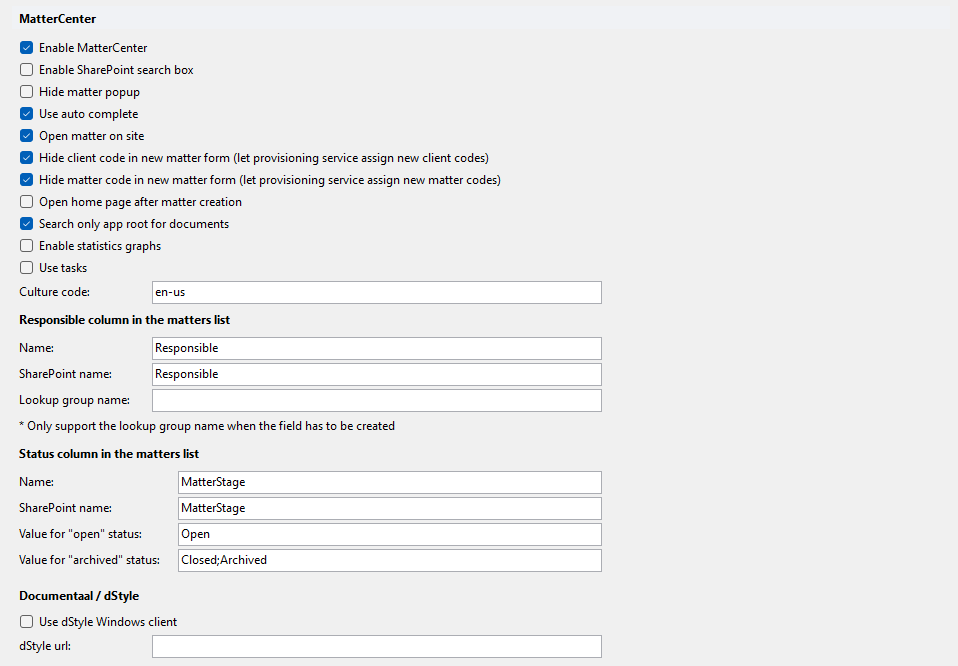
In a new SharePoint Online configuration, Epona MatterCenter is enabled and the responsible and status columns are prefilled (see the defaults below).
# Enable MatterCenter
Enables Epona MatterCenter. When checked, the MatterCenter type is set to Epona; when cleared, the type is set to CELA (Microsoft MatterCenter, see Microsoft MC). Checked in a new SharePoint Online configuration.
# Enable SharePoint search box
Shows the SharePoint search box in MatterCenter. Default: off.
# Hide matter popup
Hides the matter popup. Default: off.
# Use auto complete
Uses auto complete. Default: on.
# Open matter on site
Opens a matter on its matter site. Default: off; checked in a new SharePoint Online configuration.
# Hide client code in new matter form (let provisioning service assign new client codes)
Hides the client code field in the new matter form, so the provisioning service assigns the client code. Default: on.
# Hide matter code in new matter form (let provisioning service assign new matter codes)
Hides the matter code field in the new matter form, so the provisioning service assigns the matter code. Default: on.
# Open home page after matter creation
Opens the home page after a matter is created. Default: off.
# Search only app root for documents
Limits the document search to the app root. Default: on.
# Enable statistics graphs
Shows statistics graphs. Default: off.
# Use tasks
Enables tasks. Default: off.
# Culture code
Culture code used by MatterCenter. Default: en-us.
# Responsible column in the matters list
# Name
Name of the responsible column. Prefilled with Responsible in a new SharePoint Online configuration.
# SharePoint name
SharePoint internal name of the responsible column. Prefilled with Responsible in a new SharePoint Online configuration.
# Lookup group name
Lookup group for the responsible column. The lookup group name is only supported when the field has to be created.
# Status column in the matters list
# Name
Name of the status column. Prefilled with MatterStage in a new SharePoint Online configuration.
# SharePoint name
SharePoint internal name of the status column. Prefilled with MatterStage in a new SharePoint Online configuration.
# Value for "open" status
Status value that marks a matter as open. Prefilled with Open in a new SharePoint Online configuration.
# Value for "archived" status
Status value(s) that mark a matter as archived. Prefilled with Closed;Archived in a new SharePoint Online configuration.
# Documentaal / dStyle
Configures the Documentaal Style (LegalWord) menu in MatterCenter. See also Documentaal.
# Use dStyle Windows client
Uses the dStyle Windows client. When checked, dStyle url is set to dStyle:// and can no longer be edited; when cleared, the previous URL is restored.
# dStyle url
URL used to start dStyle from MatterCenter. Only editable when Use dStyle Windows client is cleared.
← AI MatterCenter SPFX →