
# OneDrive
Configures the OneDrive integration in DMSforLegal and Epona365 Web, and the naming of what is taken offline in OneDrive. Characters that SharePoint allows in site names but a file system does not are removed automatically.
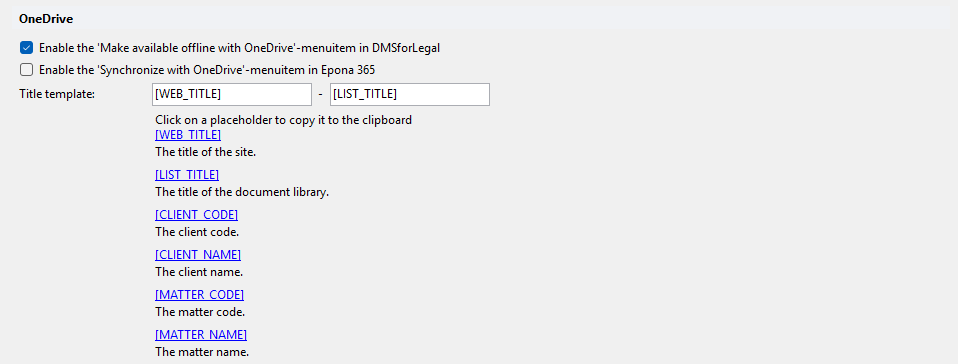
# Enable the 'Make available offline with OneDrive'-menuitem in DMSforLegal
Shows the Make available offline with OneDrive option in the right-click menu on matters in DMSforLegal. Default: on.
# Enable the 'Synchronize with OneDrive'-menuitem in Epona 365
Shows the Synchronize with OneDrive option in the right-click menu of the Epona365 Web matter view. Default: off.
# Title template
Name of the synchronized location in OneDrive. It has two parts, separated by -:
- First box: default
[WEB_TITLE]. - Second box: default
[LIST_TITLE].
Click a placeholder in the category to copy it to the clipboard:
| Placeholder | Description |
|---|---|
[WEB_TITLE] | The title of the site. |
[LIST_TITLE] | The title of the document library. |
[CLIENT_CODE] | The client code. |
[CLIENT_NAME] | The client name. |
[MATTER_CODE] | The matter code. |
[MATTER_NAME] | The matter name. |
Example: [MATTER_NAME] ([MATTER_CODE]) - [WEB_TITLE] ([LIST_TITLE]).