
# Matter View
When opening a matter in Epona365 Web, the matter view shows the full contents of that matter, including all document libraries and top-level folders.
# Create/Edit Matter
When in the DMS config Center, settings, "Category:Outlook" the setting "Enable the Create client', 'Create matter'and Edit matter'-menuitems" is enabled you can create/edit matters in Epona365 WEB.
# Folder View
Selecting a folder or document library navigates into it, showing the folder-based content such as documents and subfolders stored within.
# Tasks
A matter linked to a Microsoft 365 group with a Planner plan shows a Tasks folder, embedding that plan's Planner board — see Planners (Tasks).
# Sync to OneDrive
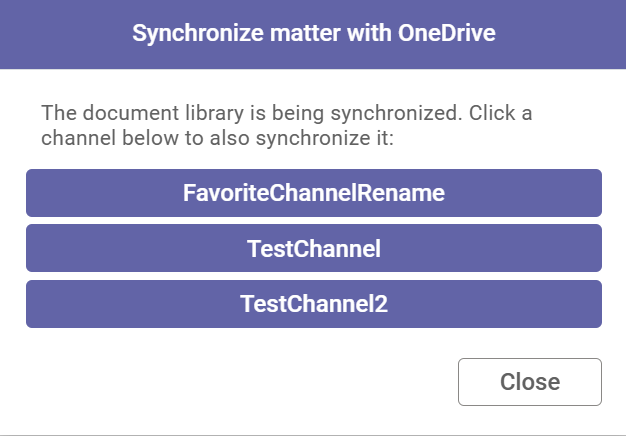
When Sync to OneDrive is enabled in DMS Config, a Synchronize with OneDrive option appears in the right-click context menu when right-clicking the matter root in the matter view. This allows you to synchronize the matter's document library to your local machine via OneDrive, so you can access and edit documents offline through Windows Explorer.
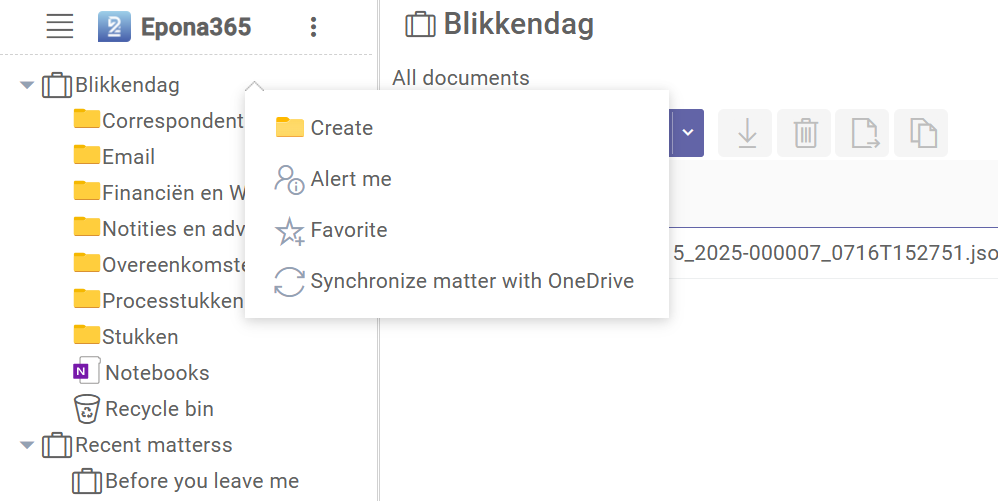
If the matter contains channels, a dialog will appear allowing you to select which channels you also want to include in the synchronization.
To enable this feature, go to DMS Config under Settings → OneDrive → Enable the 'Synchronize with OneDrive'-menuitem in Epona 365. See the DMS Configuration Center OneDrive settings for more details.