
# General settings
General switches for the DMSforLegal tree in Outlook and for the Office add-ins.
# Enable locations in the tree
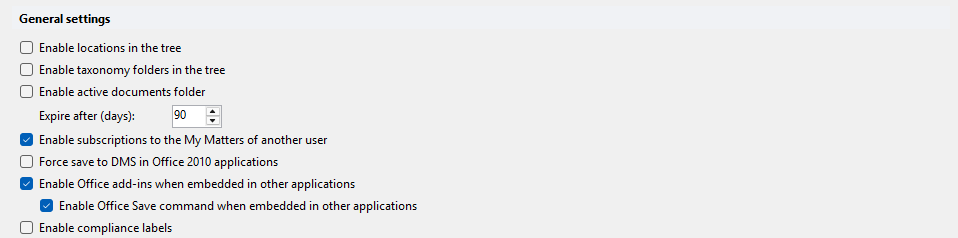
Deprecated. Comes from the Epona EmailFiler product. Shows the name of the SharePoint site configured in the data file. Only relevant for EmailFiler clients with multiple site connections. Default: off.
# Enable taxonomy folders in the tree
Shows SharePoint taxonomy views in the DMSforLegal tree in Outlook. Default: off.
# Enable active documents folder
Deprecated. Shows an active documents folder: documents that need reviewing. Default: off.
# Expire after (days)
Number of days of inactivity after which an active document expires. Range 0–1000. Default: 90. Only relevant when Enable active documents folder is on.
# Enable subscriptions to the My Matters of another user
Lets users subscribe to the My Matters of another user. The user needs permission to read or write the contents of that user's My Matters subfolder. Default: off.
# Force save to DMS in Office 2010 applications
Deprecated. Forces saving to the DMS. This is no longer possible in later versions of Office. Default: off.
# Enable Office add-ins when embedded in other applications
Enables or disables the Epona COM add-in when an external application starts an Office application in embedded mode. Example: an accounting application that runs Excel to create a report over a COM connection. Default: on.
# Enable Office Save command when embedded in other applications
Enables the Office Save command when the Office application is embedded in another application. Only available when Enable Office add-ins when embedded in other applications is on. Default: on.
# Enable compliance labels
Shows SharePoint compliance labels in DMSforLegal. Default: off.