
# Security
# v2 secrets
# Introduction
Starting with version 2025.12.04.1418, we introduced a v2 configuration which improves the security of how sensitive data (passwords, tokens, etc.) is stored. This change increases protection but also affects how the service and configuration tool must be used.
This guide explains the differences between v1 and v2 and what users need to do differently.
For argument's sake, we’ll refer to the previous configuration format as v1.
# What changed in v2?
# v1
- Secrets were stored in the same way, no matter which user saved it.
- If the
Configuratorsaved secrets using user X or Y, theSite Provisioningservice could read it regardless of which user it ran under. - Secrets were stored in the same file as other settings
# v2
- Secrets are now stored per user for higher security.
- If user X saves secrets, only user X can read it.
- This means the
Site Provisioningservice must run under the same user account that was used to save the configuration. - Secrets are stored in a separate, encrypted file.
# Impact for users
# Configurator
- v1: Any user could save the configuration (and so it's secrets).
- v2: The secrets will be saved for the active user account
# Site Provisioning service
- v1: The service can read any configuration / secret.
- v2: The service reads secrets for the active user account
# Practical examples
# Example 1 (v1)
- User Alice saves the configuration.
- User Bob runs the service.
- Result: This works — the service can read the secrets.
# Example 2 (v2)
- User Alice saves the configuration and it's secrets.
- User Bob runs the service.
- Result: This does not work — the service cannot read the secrets because it is encrypted only for Alice.
# Example 3 (v2)
- User Alice saves the configuration.
- User Bob inserts/updates and saves the secrets.
- User Bob runs the service.
- Result: This works — the service can read the secrets.
# What you need to do in v2
- Decide which user account will run the service.
- Use that same user account to run the configuration tool and save the settings.
- Configure the service to run under the same user account.
# Summary
- v2 introduces stronger security by storing secrets per user and separate from the configuration settings.
- Configuration and service must now use the same user account.
- Everything else works as before—only the way secrets are stored has changed.
# Using the configurator
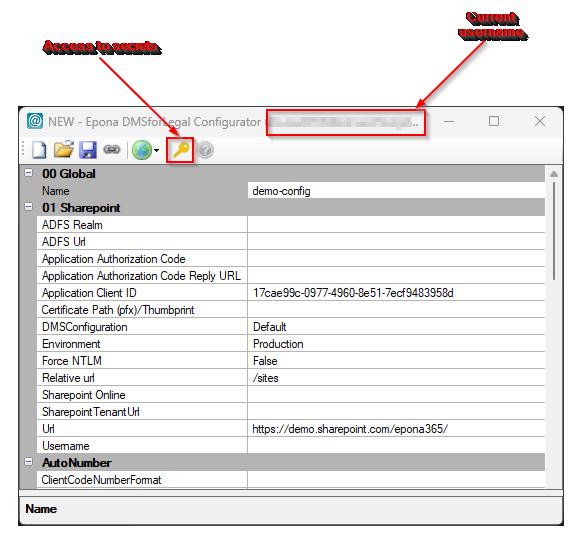
The active user(name) is shown in the window title so you can easily see the user context of the tool.
The following popup is shown when you open a
v1configuration. This message is to motivate you to start using thev2capabilities.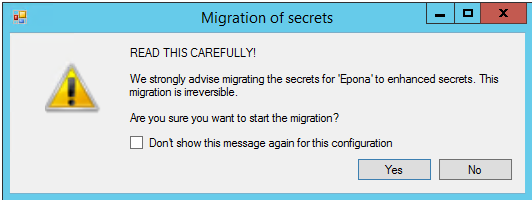
A new
Secretsbutton is added in the toolbar to access thev2secrets. When av1configuration is open and theSecretsbutton is clicked, a popup will guide you through the migration process.
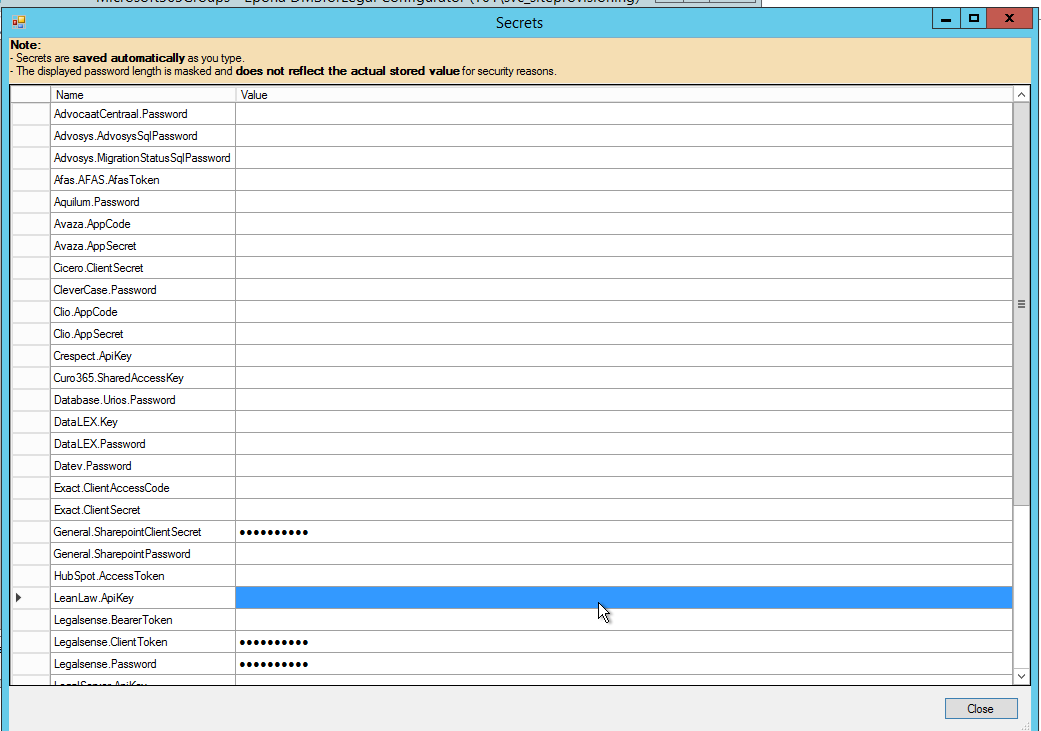
The Secrets button will open a new modal in which you can manage all secrets.
# Run as a different user
Changing the secrets requires you to run the Configurator under an application account (the account that runs the Site Provisioning service). To do this, you can use the option Shift-RightClick on the Epona.Configurator.exe.
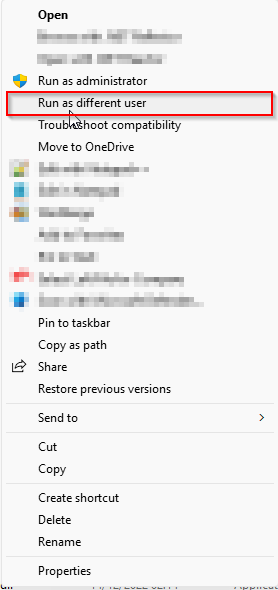
After chosing Run as different user you will need to fill in the users' credentials.